You already had Witnes running. You were already collecting real-user performance data — page loads, navigations, session signals — all to help you understand how fast your product actually is for the people using it. At some point the question became obvious: if we already have this data, why not surface it properly?
So we did. Today we’re releasing Traffic, a new section inside your Witnes dashboard that gives you a clear, honest view of who is visiting your product — no extra setup, no additional cost, and no compromise on privacy.
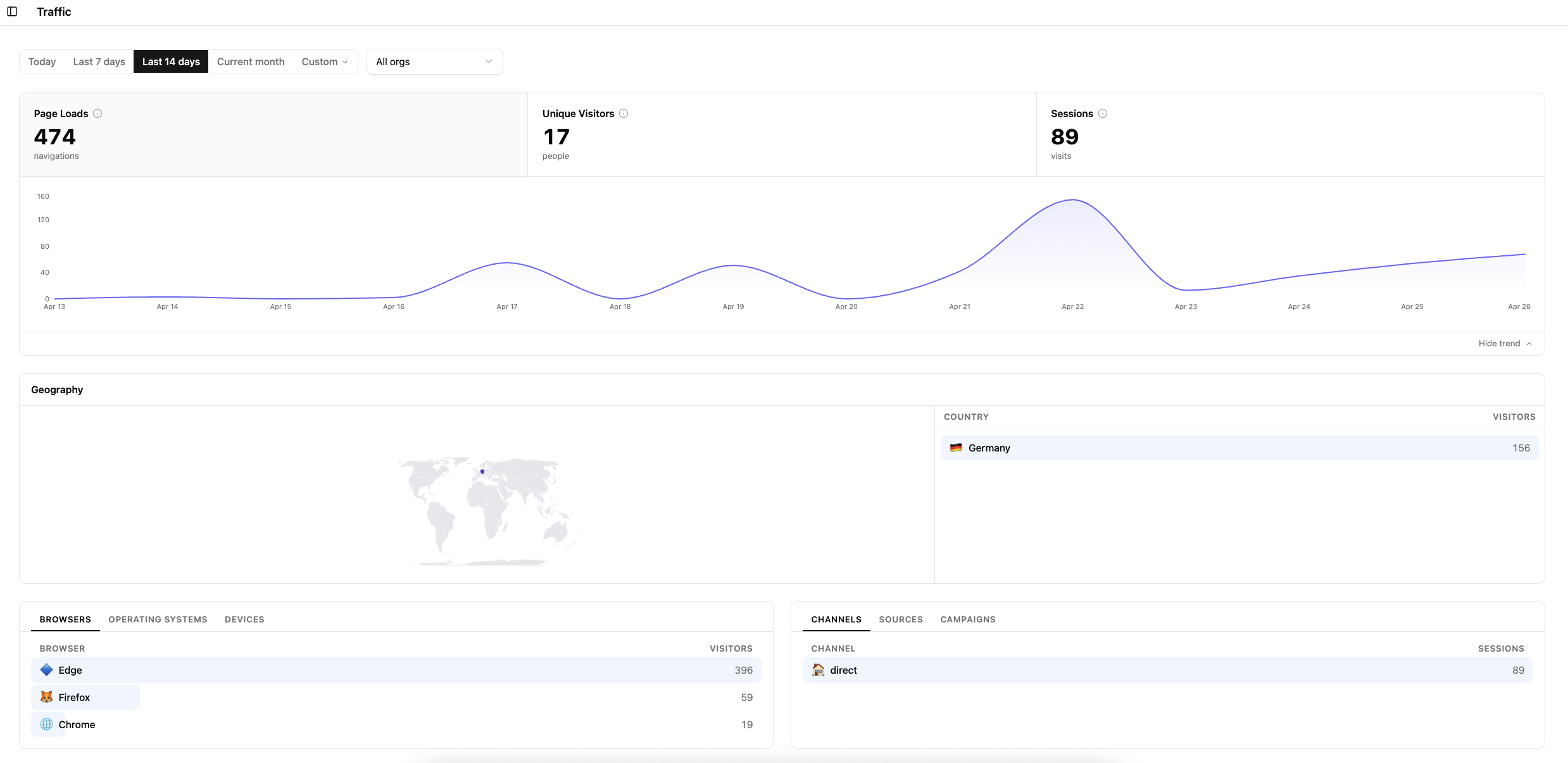
What’s in it today
Traffic lives under Analytics → Traffic in your dashboard. Here’s what you can explore right now:
The headline numbers. At a glance you see Page Loads (total navigations), Unique Visitors (distinct people), and Sessions (individual visits). You can filter by today, the last 7 or 14 days, the current month, or a custom range. If you manage multiple properties, the org filter lets you scope things down quickly.
A traffic trend chart. A clean time-series view shows how your traffic moves over the selected period. It’s collapsible if you prefer more room for the breakdown tables below.
Geography. An interactive world map paired with a country-by-country visitor table tells you where your audience is coming from. Useful for prioritizing infrastructure regions, understanding where a marketing push landed, or just satisfying curiosity.
Browsers, Operating Systems, and Devices. Three tabs covering the client-side environment your users are on. You’ll see which browsers are dominant in your audience, what operating systems they run, and which device categories they use. This kind of breakdown matters when you’re deciding where to invest in compatibility and testing.
Channels, Sources, and Campaigns. A second set of tabs breaks down how sessions arrive: direct traffic, referral sources, and UTM-tagged campaigns. If you’re running any kind of acquisition effort, this is where you start to connect it back to actual visits.
How it’s different from GA or Plausible
Tools like Google Analytics and Plausible are purpose-built analytics products. They’re good at what they do. But they are separate installs, separate dashboards, and for GA in particular, a separate data governance conversation you have to have with your legal team.
Witnes Traffic is none of those things. It’s a by-product of the performance instrumentation you already have. The Witnes script is already on your pages. It was already observing navigations and sessions to power Core Web Vitals and performance traces. Traffic just makes that signal visible in a way that’s useful beyond debugging.
A few concrete differences worth naming:
No cookies, no consent banners. Witnes has never used cookies, and Traffic inherits that entirely. There’s nothing to consent to. Your users don’t see a banner because of us, and you don’t need to update your privacy policy.
No cross-site tracking. GA’s business model is built on a graph of users across millions of sites. Ours isn’t. Witnes sees only your product. That’s a structural difference, not a setting you have to find and toggle off.
One script, two jobs. You don’t need to add a second third-party tag to get traffic data. The same lightweight script that measures performance now also surfaces traffic. Less to maintain, less surface area, fewer requests.
Already included. Traffic is available on all current Witnes plans at no extra charge. You don’t need to upgrade anything. Just navigate to the Traffic tab.
The trade-off, and we’ll be honest about it: right now Traffic is lighter than a dedicated analytics product. It’s a preview. Some things you’d find in Plausible or a mature GA setup aren’t there yet.
What’s coming
Traffic is marked as Preview for a reason. We shipped what was already real and useful rather than wait until it matched every feature on a competitor’s checklist.
You can follow exactly what’s live and what’s in progress on the Feature Status page. We keep it up to date as things ship.
We want your feedback
Traffic is new. You’ll find rough edges. If something is missing that you genuinely need, or if something is confusing, we want to hear about it. The roadmap above reflects what we think matters most — but you’re the ones using it, and you’ll know better than we do what belongs on it.
You can reach us through the dashboard or reply to this post. We read everything.
If you’re already a Witnes customer, Traffic is live in your dashboard now. No action required.